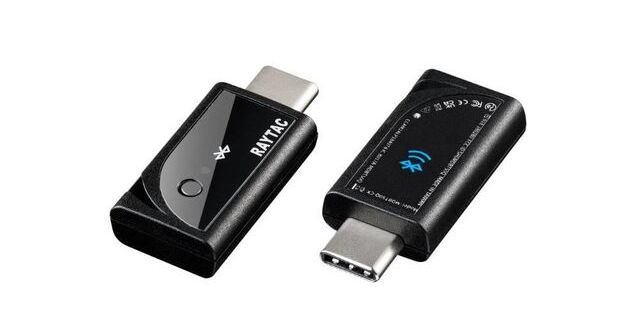
A Raytac MDBT50Q-CX-40 dongle preloaded with firmware that actively scans for DigiCue or DigiBall signals and outputs them to a computer via a virtual serial port. Most computers already contain BLE hardware for scanning, but the operating system and API layers can force throttling and time sharing of the BLE hardware with other tasks (such as WiFi communication). Additionally setting up a BLE scanner is different for every system, and it can be complicated to get working correctly. The advantages of using dedicated hardware is that it offers a plug-and-play solution with no BLE API configurations, has very low latency, greater wireless range, and accelerates a user's ability to start development quickly.
Datasheet
USB Driver for Windows
DigiBall API
DigiCue Blue API
Specs
- Model Number: MDBT50Q-CX
- Manufacturer: Raytac Corporation
- Dimensions: (L) 26.2 mm x (W) 15.1 mm x (H) 6.8 mm
- Connector: USB C
- USB 2.0 full speed (12Mbps)
- BT Stack: 5.4
- Antenna: Internal PCB
- Antenna Efficiency: 35%
- Range: Up to 250 meters in open space (1Mbps)
- Sensitivity: -95dBm RX (1Mbps)
- TX Power: 0dBm (set by firmware)
- ARM Cortex M4 32-bit processor w/ 256kB RAM
- One LED, One Button
- Delcaration ID: D066910
- FCC ID: SH6MDBT50Q
- IC: 8017A-MDBT50Q
Instructions
Plug in normally
- LED blinking slowly - Waiting to receive NRLLC advertisements
- LED solid - Received any NRLLC advertisement within the past 5 seconds
Hold button for 2 seconds while powered
- LED blinking quickly - Transmitting DigiBall advertisements as a simulation
Every 20 seconds it generates a new shot, alternating between 10.0 RPS / 45 PFC and 5.0 RPS / 25 PFC, both at 30 degrees (1:00 on a clock face).
Demo Software
dedicated-radio-demo.zip
DigiBall Scanner for Windows